Migrate to MySQL Community 8.4
Percona Server supports Percona-only features for performance and security. You can migrate to MySQL Community Edition (CE) when you follow the best practices.
Percona Server and MySQL CE share core code. Percona adds features that MySQL CE does not include. A few of those features create a “one-way door” because they change how data or metadata is written to disk, and MySQL CE cannot interpret the result. The one-way-door features are MyRocks, compressed columns, compression dictionaries, Percona keyring components (Vault, KMIP, AWS KMS), and Percona-only on-disk options such as enhanced encryption, specialized page compression, and fast_checksum.
The remaining Percona-only features do not store or alter any data. The Percona Audit Log plugin, the Audit Log Filter, Data Masking, PAM/LDAP authentication, and the thread pool are runtime features. Turn them off and remove their variables from my.cnf before you migrate. No data is lost or changed. Oracle plans to release the MySQL Enterprise equivalents of these features as open source, so you can optionally enable those on the CE instance after migration.
The following diagram summarizes migration paths. The paths cover a Percona-exclusive feature check, logical dump and restore (recommended), in-place binary swap with cleanup, and the main steps in each path.
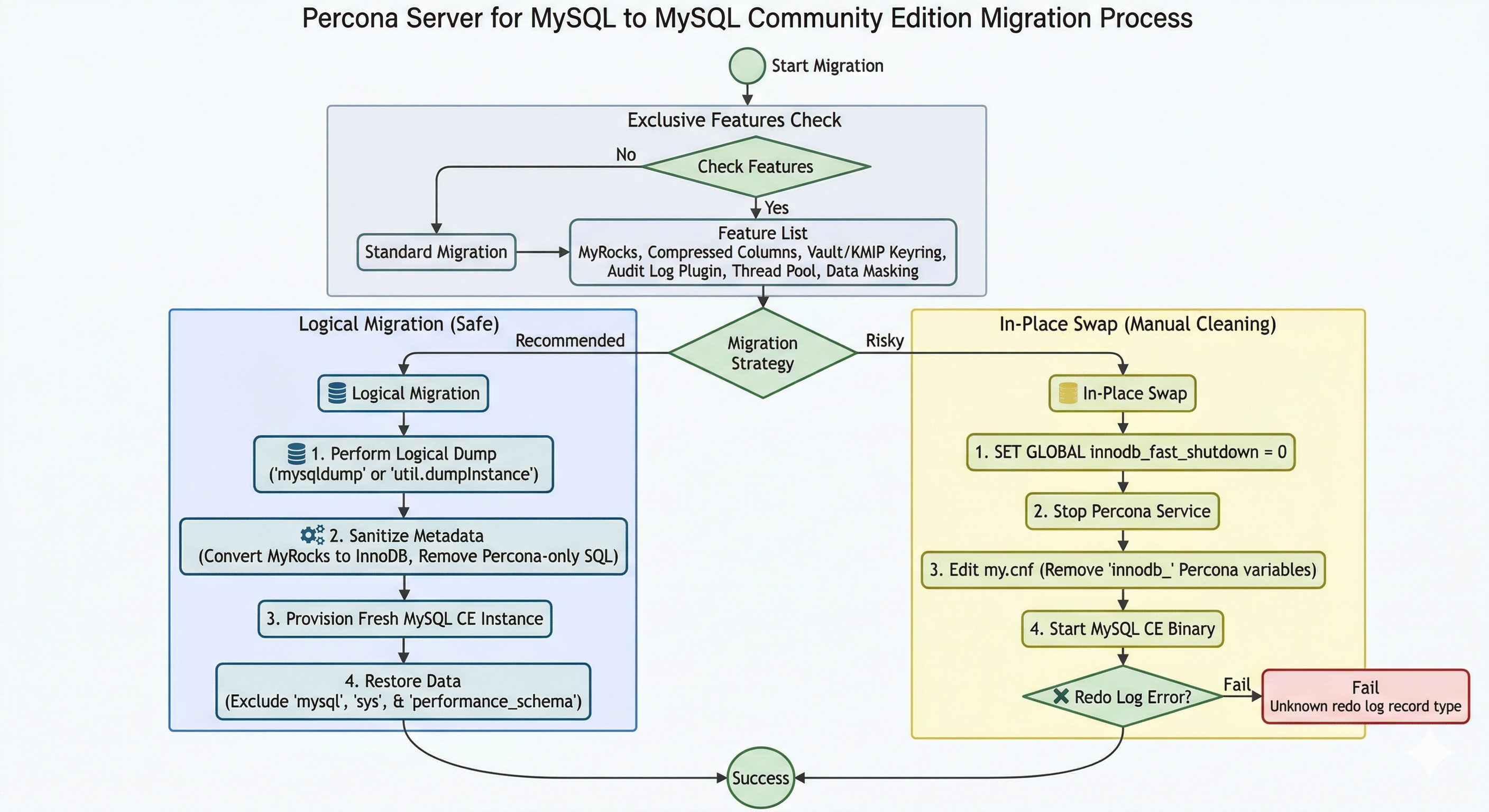
Exclusive features
When you plan a migration to MySQL CE, identify features that are exclusive to Percona. The following CE-incompatible features are inactive by default. You must install or configure MyRocks, the Percona Audit Log plugin, the Audit Log Filter component, Data Masking, and PAM/LDAP authentication explicitly. The thread pool is built in but inactive until you set thread_handling=pool-of-threads in the configuration. The following table summarizes the main exclusive features.
| Feature | Notes |
|---|---|
| MyRocks Storage Engine | Not in MySQL CE; requires explicit installation. Migration: see Performance and engine. |
| Percona Audit Log Plugin | Not in MySQL CE. Migration: see Security and auditing. |
| Audit Log Filter | Not in MySQL CE. Migration: see Security and auditing. |
| PAM / LDAP Authentication | Not in MySQL CE; require manual configuration. Migration: see Security and auditing. |
| Data Masking | Not in MySQL CE; must be manually installed. Migration: see Security and auditing. |
| Thread Pool | Built in but inactive until thread_handling=pool-of-threads. Migration: see Performance and engine. |
Performance and engine features
Percona Server includes optimizations that MySQL Community cannot parse or execute. The following table describes migration actions for engine-related exclusive features. See Exclusive features for the full list.
| Feature | Migration action |
|---|---|
| XtraDB Enhancements | Remove Percona-only innodb_ variables from my.cnf (such as innodb_empty_free_list_algorithm, innodb_track_changed_pages, innodb_corrupt_table_action, innodb_cleaner_lsn_age_factor). Basic InnoDB data is compatible. |
| Thread Pool | Disable the thread pool and use the default one-thread-per-connection model. |
| MyRocks Storage Engine | Migrate tables to InnoDB before dump (or edit dump to change ENGINE=MyRocks to ENGINE=InnoDB). |
| Compressed columns and compression dictionaries | Decompress or alter columns before dump; no CE equivalent. See the linked doc. Migration to CE is not possible until columns are changed when tables use compressed columns. |
Use the Percona Server system variables reference to list Percona-specific innodb_ variables. Remove from my.cnf any variable that does not exist in MySQL Community Edition 8.4.
Compressed columns and compression dictionaries block many migrations. You cannot migrate to MySQL CE while user tables use compressed columns. Remove or alter those columns (such as decompress the columns) before a logical dump and restore. The compressed-columns feature also creates additional tables in the system tablespace. Query the INFORMATION_SCHEMA views COMPRESSION_DICTIONARY and COMPRESSION_DICTIONARY_TABLES to detect compression dictionaries. See Compressed columns with dictionaries for view structure. Those system tables may cause problems when moving to MySQL CE even when you do not use compressed columns in user tables.
Security and auditing
The following table lists migration actions for security and auditing features that are exclusive to Percona. None of these features change stored data, so turning them off does not lose or alter anything. See Exclusive features for the full list.
| Feature | Migration action |
|---|---|
| Audit Log Plugin | Disable auditing or use a community-supported alternative. |
| Audit Log Filter | Uninstall the component and remove the component configuration. |
| PAM / LDAP Authentication | Migrate users to caching_sha2_password or mysql_native_password before switching. |
| Data Masking | Uninstall the Data Masking components. |
Operational and monitoring features
The following table summarizes operational and monitoring features that affect migration to MySQL CE.
| Feature | Notes |
|---|---|
| Extended Slow Query Log | Percona’s slow query log includes extra fields (such as Rows_examined and Thread_id). MySQL CE fails to start when Percona-only log configuration variables remain in the config file. |
| Utility Components | Uninstall features such as the UUID_VX component or keyring plugins that are exclusive to Percona. |
| Percona Toolkit UDFs | Not in MySQL CE. Uninstall the component and rewrite any views, triggers, stored procedures, or generated columns that call these functions before migration. |
Use the Percona Server system variables reference to find Percona-only slow-query and log variables. Remove from my.cnf any of these variables when present: log_slow_filter, log_slow_rate_limit, log_slow_rate_type, log_slow_sp_statements, log_slow_verbosity, slow_query_log_always_write_time, and slow_query_log_use_global_control.
Remove or replace Percona-exclusive keyring components and variables before migration. MySQL CE does not support the following components. Uninstall them and remove their configuration:
-
component_keyring_vault(HashiCorp Vault),component_keyring_kmip(KMIP), andcomponent_keyring_kms(AWS KMS). See the Keyring components overview for details. -
keyring_vault_configandkeyring_vault_timeout. Remove these variables frommy.cnf. The Percona Server system variables reference lists all Percona-only variables.
MySQL CE supports file-based keyring components (such as component_keyring_file and component_keyring_encrypted_file). Plan to use one of these keyring options, or another option documented for MySQL CE, when you need encryption after migration.
You can migrate to MySQL CE when you use Percona keyring components (Vault, KMIP, or AWS KMS). You cannot use an in-place package swap for that path. MySQL CE cannot load those components or decrypt data encrypted with them. Export data from Percona Server while the keyring is active; the server decrypts on read. Restore the dump into a fresh MySQL CE instance. Enable a CE-supported keyring (such as the file component) on the CE instance when you need encryption at rest after migration.
MySQL CE may not read pages when you used Percona enhanced encryption, specialized page compression, or fast_checksum. Those options alter how data is written to disk. The Community binary cannot open that on-disk layout. Before migration, complete these steps:
-
Do not copy data files or perform an in-place binary swap.
-
Run mysqldump (or another logical dump tool) from Percona Server while the relevant features remain enabled so the server can read the data.
-
Restore the dump into a fresh MySQL CE instance.
-
Remove Percona-only on-disk format options (such as
fast_checksum) from the CE instance configuration.
Percona Toolkit UDFs
Percona Server can install optional Percona Toolkit UDFs (fnv_64, fnv1a_64, and murmur_hash) through the component_percona_udf component. MySQL CE does not include these functions. MySQL CE fails when parsing or executing a view, trigger, stored procedure, event, or generated column that references them. A logical restore also fails when dump metadata still references these functions.
Before migration, locate registered functions and dependent SQL objects on Percona Server. Then remove or rewrite those objects:
SELECT component_id, component_urn
FROM mysql.component
WHERE component_urn LIKE '%percona_udf%';

SELECT name, type, dl
FROM mysql.func
WHERE dl LIKE '%toolkit%'
   OR dl LIKE '%fnv%'
   OR dl LIKE '%murmur%'
   OR name IN ('fnv_64', 'fnv1a_64', 'murmur_hash');

SELECT ROUTINE_SCHEMA, ROUTINE_NAME, ROUTINE_TYPE
FROM information_schema.ROUTINES
WHERE ROUTINE_DEFINITION LIKE '%fnv_%'
   OR ROUTINE_DEFINITION LIKE '%murmur_hash%';

SELECT TABLE_SCHEMA, TABLE_NAME
FROM information_schema.VIEWS
WHERE VIEW_DEFINITION LIKE '%fnv_%'
   OR VIEW_DEFINITION LIKE '%murmur_hash%';
On Percona Server, uninstall the component (or drop legacy functions when present). Change each dependent object to use CE-supported expressions:
UNINSTALL COMPONENT 'file://component_percona_udf';
When functions were registered through the older mysql.func mechanism, drop them explicitly after uninstalling the component. Rewrite or drop routines and views that still reference the function names. Then run a logical dump.
Best practices: migrating to MySQL CE
An in-place package swap rarely succeeds when you have used Percona-exclusive features. Follow the sections in this guide for a reliable migration.
Requirement for logical migration
Binary incompatibilities and Percona-specific metadata block many in-place paths. MyRocks and Percona keyring components are common causes. The reliable method to migrate to MySQL CE is a logical dump and restore.
Complete these steps for logical migration:
-
Provision a fresh instance: configure a new MySQL CE instance.
-
Dump data: use mysqldump (or another logical dump tool) to export data from Percona Server.
-
Restore: import the logical file into the fresh MySQL CE instance.
Metadata and sanitization steps
Dump and restore alone often fail when Percona-specific features left traces in metadata. Apply the following sanitization steps before migration:
-
Storage engine conversion: convert MyRocks tables to InnoDB before the dump, or edit the SQL script to change
ENGINE=MyRockstoENGINE=InnoDB. -
Compressed columns and compression dictionaries: remove or alter compressed columns before migration. Change
COLUMN_FORMAT COMPRESSEDtoCOLUMN_FORMAT DEFAULTor another supported format when needed. MySQL CE does not support compressed columns. -
Authentication cleanup: drop or modify users that use Percona-exclusive plugins (such as
authentication_pamorauthentication_ldap). Assign a CE-supported plugin (such ascaching_sha2_password) before migration. -
Configuration sanitization: remove all Percona-only variables from
my.cnf(such asaudit_log_*,thread_pool_*, or extended slow_query_log variables). MySQL CE exits at startup when the configuration file contains a Percona-specific variable. -
On-disk format (enhanced encryption, specialized page compression, or
fast_checksum): do not copy data files or switch binaries in place when InnoDB page layout changed. Run a logical dump from Percona Server while the server runs and the feature remains enabled. Restore the dump into a fresh MySQL CE instance. Omit Percona-only on-disk format options from the CE configuration. -
System table cleanup: Percona sometimes adds columns to system tables for internal tracking. A logical dump of user databases is usually safe. Dumping and restoring the
mysqlsystem schema can cause severe schema mismatches. -
System schemas (
performance_schema,sys): Percona 8.4 adds telemetry and diagnostic tables that MySQL CE does not recognize. Reusing or restoring those schemas leaves orphaned metadata. Orphaned objects can collide with tables or columns during a future MySQL CE minor-version upgrade. Prefer a logical dump and restore of user data only. Let the MySQL CE instance createperformance_schemaandsysat startup. See Telemetry on Percona Server for MySQL and Additional PERFORMANCE_SCHEMA tables.
Perform a clean shutdown before an in-place binary swap
The log sequence number (LSN) is a 64-bit integer. InnoDB uses the LSN as a unique identifier for every database change. The LSN orders and recovers InnoDB work.
Standard MySQL LSN records track inserts, updates, and deletes. Percona Server adds extra information to log records. The extra data supports fast checkpointing, parallel doublewrite buffers, and changed page tracking for incremental backups.
Percona Server writes specialized record types into the redo log (ib_logfile0, ib_logfile1). When you shut down Percona Server and start MySQL CE against the same data directory, MySQL CE runs crash recovery on the redo log. The MySQL CE parser encounters Percona-specific log records without a matching definition. The MySQL service fails to start with an error similar to the following:
[ERROR] [MY-011899] [InnoDB] Unknown redo log record type 123
Empty the redo log before you switch binaries. Use a clean shutdown. Follow these steps:
-
Set the global fast shutdown option to 0 (slow/full shutdown) so that InnoDB flushes all dirty pages and clears the redo log completely:
SET GLOBAL innodb_fast_shutdown = 0;With the default value 1, the server skips a full purge and insert buffer merge and can leave data in the redo log. With value 0, the server flushes all dirty pages and clears the redo log completely.
-
Stop the Percona Server service.
-
Optionally, move or delete the redo log files (
ib_logfile0andib_logfile1) from the data directory so that MySQL CE does not see old log files. This step is optional but reduces the risk of parsing Percona-specific log records. -
Replace the Percona Server binaries with MySQL Community Edition (install MySQL CE).
-
Start MySQL. With the redo log empty or removed, MySQL CE starts without parsing Percona-specific LSN or log records.
-
Validate system metadata after MySQL CE starts. A clean shutdown clears the redo log but does not remove Percona telemetry or diagnostic objects from
performance_schema,sys, or the sharedmysqlschema. Those structures remain in the system tablespace metadata. The MySQL CE data dictionary parser can encounter columns and tables that Percona authored but CE did not. Monitor the error log for data dictionary or schema upgrade warnings. Test a MySQL CE minor-version upgrade on a staging copy of the datadir before you upgrade production. See System schemas during an in-place binary swap.
System schemas during an in-place binary swap
An in-place binary swap keeps the existing data directory. On-disk definitions for the mysql, performance_schema, and sys schemas remain. MySQL CE does not remove Percona-only telemetry or diagnostic objects from performance_schema and sys. The CE instance often starts after a clean shutdown and configuration cleanup. Extra tables are not required for normal operation. Extra objects remain on disk. They can cause errors or failed schema steps during a later MySQL CE minor-version upgrade. The CE binary expects a schema layout that matches a vanilla installation.
The mysql system schema is also shared. Percona may add columns or internal structures that CE does not use. CE usually tolerates unused extras. Dumping and restoring the mysql schema during a logical migration can still produce severe mismatches. The same caution applies when you reuse a Percona-populated mysql schema after an in-place swap and later run upgrade helpers against that datadir.
Treat an in-place swap as high risk when Percona telemetry or diagnostic tables are present. Prefer a logical dump and restore of user databases only. Let MySQL CE create fresh performance_schema and sys schemas. When you must use an in-place swap, validate after the first successful CE startup. Check the error log. Confirm mysql.component contains no Percona-only entries. Test a minor-version upgrade on a staging copy of the datadir before you upgrade production.
Data dictionary and SDI compatibility
Starting in MySQL 8.0, table metadata lives in the InnoDB transactional data dictionary. Tablespace files also store Serialized Dictionary Information (SDI). User tables that use standard InnoDB row formats are binary-compatible between Percona Server 8.4 and MySQL CE 8.4. Compatibility applies when you do not use Percona-only on-disk features. Those features include compressed columns, specialized page compression, fast_checksum, and enhanced encryption layouts. A clean shutdown with innodb_fast_shutdown = 0 can leave a data directory that CE opens for ordinary InnoDB user data after the redo log is cleared.
SDI and dictionary compatibility do not apply when Percona-only features altered table or page layout. Those cases require a logical dump and restore. Do not use an in-place file swap.
Replication compatibility for rolling migrations
Many production migrations use replication instead of full downtime. Operations teams often provision a MySQL CE 8.4 replica under a running Percona Server 8.4 source. The replica synchronizes until cutover. This rolling path reduces dump/restore windows when prerequisites are met.
A MySQL CE 8.4 instance can replicate as a downstream replica from a Percona Server 8.4 source when the replica uses only CE-supported features. Confirm the following before cutover:
-
Row-Based Replication (RBR) is recommended on the source and replica. Set
binlog_format=ROW. The known statement-based incompatibility with MySQL CE is Percona’sSET STATEMENT <variable>=<value> FOR <statement>syntax. RBR logs row changes instead of that statement, so the replica does not have to parse it. Statement-based or mixed replication can work when the binary log does not containSET STATEMENT. Use the upstream-compatibleSET_VARoptimizer hint instead; see Extended SET VAR optimizer hint. -
MyRocks does not have to be absent from the source. The binary log is engine-independent, so row events from MyRocks tables apply on the replica as ordinary row changes. Create the matching tables on the MySQL CE replica as InnoDB (for example, restore a dump after changing
ENGINE=MyRockstoENGINE=InnoDB). DDL that specifiesENGINE=ROCKSDBfails on CE because the engine is not present. Convert MyRocks tables to InnoDB on the source only when you also plan to run MySQL CE on that instance after cutover. -
Percona Toolkit UDFs (
fnv_64,fnv1a_64,murmur_hash) do not have to be removed from the source. MySQL CE does not shipcomponent_percona_udf, so a replica that executes those function names must define matching UDFs locally. Create them on the replica withCREATE FUNCTION ... SONAME(using the Toolkit UDF libraries). Alternatively, rewrite or drop dependent routines on the source so the replica never calls the functions. See Percona Toolkit UDFs. -
The replica
my.cnfmust not contain Percona-only system variables. Unknown variables prevent MySQL CE from starting. -
Match Global Transaction Identifier (GTID) mode and
enforce_gtid_consistencywhen you use GTIDs. Confirm version-specific replication features on both source and replica. -
Percona-only plugins and components must not load on the replica. Uninstall Audit Log Filter, Data Masking, Percona keyring components, and similar features on the replica before you start MySQL CE.
After cutover, run the identification queries on the former source when that instance will also run MySQL CE.
A clean shutdown and empty redo log do not remove other incompatibilities. Examples include Percona-only variables in my.cnf, plugins, and on-disk page formats. Prefer a logical dump and restore unless you sanitized configuration and confirmed no Percona-only features alter data or metadata.
Percona-specific Data Compression modifies .ibd data files on disk. A clean shutdown does not fix that incompatibility. Standard MySQL cannot read those compressed pages. Before migration, use a logical dump (such as mysqldump) and import into a MySQL CE instance. Do not copy data files or attempt an in-place binary swap.
Summary of the one-way door risk
Only the high-risk rows are true one-way doors. Those features change data or metadata on disk and require conversion before you migrate. The low-risk rows are runtime features or configuration entries: turn them off, and your data is unaffected.
| Feature | Risk Level | Reversion Difficulty |
|---|---|---|
| MyRocks | High | Requires full table conversion to InnoDB before dump. |
| Compressed columns / compression dictionaries | High | Cannot migrate to CE when tables use them; decompress or alter columns before dump. System tablespace changes may cause issues even when unused. |
Enhanced encryption / specialized page compression / fast_checksum |
High | These options alter data on disk; MySQL CE cannot read those pages. Use a logical dump from Percona with the features active, then restore to CE. Do not copy data files or switch binaries in place. Remove Percona-only on-disk format options from config before bringing up CE. |
| Audit Log Plugin / Audit Log Filter / Data Masking | Low | Uninstall the plugin or component and remove its configuration. No stored data is affected. The MySQL Enterprise equivalents, which Oracle plans to open source, can replace them after migration. |
| PAM / LDAP Authentication | Low | Reassign affected accounts to a CE-supported authentication plugin before the switch. No stored data is affected, but those accounts need new credentials. |
| Configuration | Low | Requires manual cleanup of my.cnf. |
| Thread Pool | Low | Remove thread_handling=pool-of-threads and the thread_pool_* variables to return to default thread handling. No stored data is affected. |
| performance_schema / sys (Percona telemetry and diagnostic tables) | Medium | Orphaned metadata can collide during future CE minor-version upgrades. Use a logical dump/restore of user data only; do not dump/restore system schemas. |
Percona Toolkit UDFs (fnv_64, fnv1a_64, murmur_hash) |
Medium | Uninstall component_percona_udf; rewrite or drop dependent views, routines, and generated columns. |
How to identify active Percona-exclusive features
Run the following SQL commands to find Percona-exclusive features in your environment. These queries target incompatible components and metadata that block migration to MySQL CE.
Identify active exclusive plugins
The following query identifies active plugins only (not components). The query returns Percona-exclusive plugins such as the Audit Log plugin, PAM/LDAP authentication, and MyRocks.
SELECT PLUGIN_NAME, PLUGIN_VERSION, PLUGIN_STATUS
FROM INFORMATION_SCHEMA.PLUGINS
WHERE PLUGIN_NAME IN (
    'audit_log',
    'authentication_pam',
    'authentication_ldap_simple',
    'authentication_ldap_sasl',
    'ROCKSDB',
    'ROCKSDB_TRX',
    'ROCKSDB_LOCKS'
) AND PLUGIN_STATUS = 'ACTIVE';
Identify active exclusive components
Percona-exclusive components (such as the Audit Log Filter, Data Masking, and keyring components) register in mysql.component. The following query lists installed components whose URN matches known Percona-only components.
SELECT component_id, component_urn
FROM mysql.component
WHERE component_urn LIKE '%audit_log_filter%'
   OR component_urn LIKE '%masking_functions%'
   OR component_urn LIKE '%keyring_vault%'
   OR component_urn LIKE '%keyring_kmip%'
   OR component_urn LIKE '%keyring_kms%';
Check for MyRocks storage engine usage
MyRocks is a high-risk one-way door. Check whether any user tables use the engine. Convert those tables to InnoDB before a logical dump.
SELECT TABLE_SCHEMA, TABLE_NAME, ENGINE
FROM INFORMATION_SCHEMA.TABLES
WHERE ENGINE = 'RocksDB'
AND TABLE_SCHEMA NOT IN ('information_schema', 'sys', 'performance_schema', 'mysql');
Identify Percona-specific authentication
MySQL CE does not recognize users that use Percona PAM or LDAP plugins. Find those users and change authentication to caching_sha2_password or mysql_native_password before migrating.
SELECT user, host, plugin
FROM mysql.user
WHERE plugin LIKE '%pam%'
   OR plugin LIKE '%ldap%';
Verify thread pool status
The thread pool code exists in Percona Server. The thread pool affects migration only when actively configured. The following command shows whether the server uses Percona scalable thread pool handling instead of the standard MySQL connection model.
SHOW VARIABLES LIKE 'thread_handling';
-- When the result is 'pool-of-threads', the Percona Thread Pool is active.
Identify Percona Toolkit UDFs
Percona Toolkit UDFs (fnv_64, fnv1a_64, murmur_hash) support fast checksumming and hashing. Teams often use them in views, stored procedures, triggers, or generated columns for sharding or indexing. MySQL CE does not ship these compiled symbols.
Audit the UDF registry and component installation on Percona Server before export:
SELECT component_id, component_urn
FROM mysql.component
WHERE component_urn LIKE '%percona_udf%';

SELECT name, type, dl
FROM mysql.func
WHERE name IN ('fnv_64', 'fnv1a_64', 'murmur_hash')
   OR dl LIKE '%toolkit%';
Drop Percona Toolkit UDFs before export
A logical restore into MySQL CE fails when the dump contains views, triggers, stored procedures, or generated columns that reference Percona Toolkit UDFs. Uninstall component_percona_udf, drop legacy mysql.func registrations, and refactor dependent routines on Percona Server before the export phase.
Search for SQL objects that reference these functions:
SELECT ROUTINE_SCHEMA, ROUTINE_NAME, ROUTINE_TYPE
FROM information_schema.ROUTINES
WHERE ROUTINE_DEFINITION LIKE '%fnv_%'
   OR ROUTINE_DEFINITION LIKE '%murmur_hash%';

SELECT TABLE_SCHEMA, TABLE_NAME
FROM information_schema.VIEWS
WHERE VIEW_DEFINITION LIKE '%fnv_%'
   OR VIEW_DEFINITION LIKE '%murmur_hash%';
Before migration, run UNINSTALL COMPONENT 'file://component_percona_udf'; on Percona Server. Drop legacy mysql.func entries when present. Rewrite dependent objects. See Percona Toolkit UDFs.
Check for Data Masking components
To confirm Data Masking separately from the general components query in the preceding section, run:
SELECT * FROM mysql.component WHERE component_urn LIKE '%masking%';
Pre-migration sanitization summary
After you identify these features, apply the following actions:
-
For MyRocks tables: run
ALTER TABLE <TABLE_NAME> ENGINE=InnoDB;. -
For PAM/LDAP users: run
ALTER USER '<USER>'@'<HOST>' IDENTIFIED WITH 'caching_sha2_password' BY '<PASSWORD>';. -
For active plugins: run
UNINSTALL PLUGIN <PLUGIN_NAME>;and remove matchingload_extensionorplugin-loadentries frommy.cnf. -
For active components: run
UNINSTALL COMPONENT '<COMPONENT_URN>';for each Percona-only component (such as'file://component_audit_log_filter','file://component_masking_functions', or keyring components). Remove the component from the server manifest or configuration so the component does not load on the next startup. -
For Percona Toolkit UDFs: run
UNINSTALL COMPONENT 'file://component_percona_udf';, drop legacy entries inmysql.func, and rewrite or drop views, triggers, stored procedures, and generated columns that referencefnv_64,fnv1a_64, ormurmur_hash.
Search my.cnf for variable names in the Percona Server system variables reference. Remove any variable that MySQL CE does not support. MySQL CE exits at startup when a Percona-only variable remains in the configuration file.
Pre-migration checklist
| Category | Percona Feature to Disable/Remove | Community Alternative |
|---|---|---|
| Engine | MyRocks Storage Engine | Migrate to InnoDB |
| Engine | Compressed columns / compression dictionaries | Decompress or alter columns; no CE equivalent |
| Scaling | Scalable Thread Pool | Default connection handling |
| Auth | LDAP/PAM Authentication | caching_sha2_password |
| Audit | Percona Audit Log Plugin | Remove or uninstall |
| Audit | Audit Log Filter component | Uninstall component and remove configuration |
| Security | Data Masking component | Uninstall component |
| Security | Keyring components (Vault, KMIP, AWS KMS) | Uninstall; use CE file-based keyring if needed |
| Engine / Security | Enhanced encryption, specialized page compression, or fast_checksum |
These alter data on disk; CE may not read those pages. Do not copy data files. Use logical dump from Percona with features active, then restore to CE. Remove Percona-only on-disk format options from config for the CE instance. |
| Config | Percona-only log/slow-query variables | Remove from my.cnf (see system variables reference) |
| Config | Performance-specific innodb_ tweaks | Reset to default MySQL 8.4 values |
| Config | keyring_vault_config, keyring_vault_timeout | Remove from my.cnf |
| Other | UUID_VX and other Percona utility components | Uninstall component |
| Other | Percona Toolkit UDFs (component_percona_udf) |
Uninstall component; rewrite dependent SQL objects |
| System schemas | performance_schema / sys (Percona telemetry and diagnostic tables) | Do not dump or restore; let MySQL CE create clean schemas at startup. Dump and restore user data only. In-place swap: extra Percona objects may remain; validate upgrades in staging. |
| Replication | Rolling migration (CE replica from Percona source) | RBR recommended; no SET STATEMENT in statement-based binlog; MyRocks DML is fine (create replica tables as InnoDB); Toolkit UDFs optional on replica (CREATE FUNCTION); matching GTID settings; CE-clean my.cnf on replica |